$ agent-lab gallery
See it work
The interactive piece from the front page, with room to try it, followed by Agent Lab’s logo, colors and type.
Everything the agent can reach, and what it can’t.
Both agents run in their no-prompts mode, as an unprivileged user in a container that only has the project you named. Pick something the agent might try and see where it lands. Switch to codex-lab, or turn credentials off, and the map changes with it.
$ claude-lab ~/code/myapp
Inside the container runs claude --dangerously-skip-permissions
- ~/code/myapp /workspace/myapp bind mount, read-write
- claude-lab-home /home/claude named volume: agent login, MCP servers
- agent-lab-github /github named volume: GitHub login
- agent-lab-gcloud /gcloud named volume: Google Cloud login
- tmpfs /tmp noexec, nosuid, 1 GB
cap_drop: ALL · no-new-privileges · pids_limit 4096
Not mounted
- Your home folder
- ~/code/other-project
- SSH keys and agent
- Docker socket
The agent tries…
-
Works. The project folder is the one host folder the agent can change, so this deletes it on your computer too. Inside the project the agent can do anything.
-
Nothing there. Only
myappis mounted. For a task across several repositories, start the lab on their common parent folder instead. -
Not there. Inside the container
~is/home/claude, a Docker volume. Your real home folder and your SSH agent aren’t mounted. -
There’s no Docker socket in the container, so it can’t start containers or reach the host through Docker.
-
Refused. The container drops every Linux capability and sets
no-new-privileges, so nothing inside can gain more rights than it started with. -
A fork bomb. It stops at the process cap, 4096 by default (
AGENT_LAB_PIDS_LIMIT). -
Works when credentials are mounted: the shared GitHub login lives at
/github. Anything running in the session can read it, which is why a project’s setup commands ask for approval first.Fails. With
AGENT_LAB_NO_CREDENTIALS=1the GitHub and Google Cloud volumes aren’t mounted at all. Use this for repositories you don’t trust.
Assets
Logo, colors, and type.
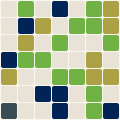
Mark
The project’s generated logo mark. The grid gets finer with the commit count, and the cells show the split between languages. It’s redrawn as the project grows.
Palette
The colors Agent Lab uses across this site: one hue from its discipline’s band, plus the shades that make it work on both dark and light backgrounds.
Type
The two typefaces on the site: a sans-serif for the interface and a serif for headlines.
Next
Put Agent Lab in your pipeline
Ask about hooking it up to the repositories and agents you already run.