$ d-snap gallery
See it work
The interactive piece from the front page, with room to try it, followed by D-Snap’s logo, colors and type.
Undo what an agent did, in one command.
The desktop app does all of this with buttons. The dsnap tool does it from a terminal, and from Claude Code’s hooks.
-
dsnap snap -m "before the agent"
Saved version 14 "before the agent" (+0 ~2 -0)
-
dsnap status
M src/router.ts +38 -11
M src/db.ts +4 -27
A src/cache.ts +61 -0
D test/router.test.ts
-
dsnap diff --file src/db.ts
--- a/src/db.ts
+++ b/src/db.ts
@@ -18,6 +18,3 @@
const rows = await query(sql, params);
- if (!rows.length) {
- throw new NotFound(id);
- }
return rows[0];
-
dsnap restore . 14
Restore to version 14 "before the agent":
write src/router.ts
write src/db.ts
write test/router.test.ts
delete src/cache.ts
Restore now? [y/N] y
Restored: 3 written, 1 deleted.
Undo with: dsnap restore "." 15
-
dsnap list
15 2026-10-02 14:31:07 safety +1 ~2 -1 Before restore to before the agent
14 2026-10-02 14:08:52 cli * +0 ~2 -0 before the agent
13 2026-10-02 13:40:15 auto +2 ~5 -1 2026-10-02 13:40:15
Assets
Logo, colors, and type.
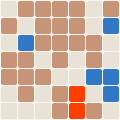
Mark
The project’s generated logo mark. The grid gets finer with the commit count, and the cells show the split between languages. It’s redrawn as the project grows.
Palette
The colors D-Snap uses across this site: one hue from its discipline’s band, plus the shades that make it work on both dark and light backgrounds.
Type
The two typefaces on the site: a sans-serif for the interface and a serif for headlines.
Next
Put D-Snap in your pipeline
Ask about hooking it up to the repositories and agents you already run.