$ disktree gallery
See it work
The interactive piece from the front page, with room to try it, followed by disktree’s logo, colors and type.
Scan, mark, and see exactly what’s about to go.
Pick a scanner and watch it run. Then open a folder with Enter, mark things with Space (marks stay while you move around), and press d for the Recycle Bin or D to delete for good. The confirmation lists full paths, because two folders called target look the same otherwise.
C:\Users\you — 762.3 GB, 1,625,175 files (48 unreadable)
- 662.9 GB 87.0%████████▊ 1,004,904AppData\
- 39.2 GB 5.1%▌ 77,498Documents\
- 20.2 GB 2.6%▎ 59,412Dropbox\
- 18.7 GB 2.5%▎ 2,306Downloads\
- 9.6 GB 1.3%▏ 244,164.rustup\
- 7.9 GB 1.0%▏ 418Videos\
- 3.8 GB 0.5% 236,473.cargo\
Move to Recycle Bin
Move 2 item(s) (26.5 GB) to the Recycle Bin?
C:\Users\you\Documents\code\framewatch\target (15.1 GB) C:\Users\you\Documents\code\disktree\target (11.4 GB)
[Y]es [N]o
C:\Users\you is the README’s screenshot; the folders under it and the rest of C:\ are made up.
Scan times are the README’s measurements on the developer’s machine (a cold walk of a 1.6M-file folder took 41 s, a whole-volume MFT read 10–21 s), played back ten times faster.Assets
Logo, colors, and type.
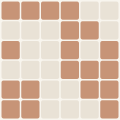
Mark
The project’s generated logo mark. The grid gets finer with the commit count, and the cells show the split between languages. It’s redrawn as the project grows.
Palette
The colors disktree uses across this site: one hue from its discipline’s band, plus the shades that make it work on both dark and light backgrounds.
Type
The two typefaces on the site: a sans-serif for the interface and a serif for headlines.
Next
Install disktree
It’s on crates.io. You’ll need Rust 1.88 or newer.
cargo install disktree
Windows is the main target. The parallel scanner and the TUI also run on Linux and macOS. The fast MFT scan needs an NTFS drive and an elevated terminal on Windows.
Questions, or something it doesn’t do yet? Email dmoore@