See it work
The interactive piece from the front page, with room to try it, followed by Scribe’s logo, colors and type.
Thursday planning
- Speaker 0
Okay, first thing. Where are we on the release?
- Speaker 1
The build’s ready. I’d like it out on the fourteenth if QA signs off by Monday.
- Speaker 2
QA can do Monday. The only open bug is the printer driver on the old laptops.
- Speaker 0
Let’s not hold the date for that. Ship it with a note about the known issue.
- Speaker 1
Works for me. Next is the budget for the office chairs.
- Speaker 2
Facilities says there’s about four thousand dollars left this quarter.
- Speaker 0
That covers twelve chairs. Can you send me the quote by Friday?
Search by meaning
“how much is left to spend”
- Speaker 2
Facilities says there’s about four thousand dollars left this quarter.
keyword – · meaning #1 · 0.0164 - Speaker 1
Works for me. Next is the budget for the office chairs.
keyword – · meaning #2 · 0.0161 - Speaker 0
That covers twelve chairs. Can you send me the quote by Friday?
keyword – · meaning #3 · 0.0159
Assets
Logo, colors, and type.
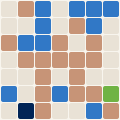
Mark
The project’s generated logo mark. The grid gets finer with the commit count, and the cells show the split between languages. It’s redrawn as the project grows.
Palette
The colors Scribe uses across this site: one hue from its discipline’s band, plus the shades that make it work on both dark and light backgrounds.
Type
The two typefaces on the site: a sans-serif for the interface and a serif for headlines.
Next
Install Scribe
The server installs with one command. It sets up Postgres, downloads the speech models (about 750 MB), and can publish itself on your Tailscale network.
curl -fsSL https://raw.githubusercontent.com/dmoore-dwmmholdings/scribe-local/master/install.sh | bash
On Windows, run it from Git Bash and it installs the latest release. On Linux and macOS it runs the server in Docker. Add --service to start it at boot, or --no-tailscale to keep it on your local network. The iPhone app is built from source in Xcode for now.
Questions, or something it doesn’t do yet? Email dmoore@