See it work
The interactive piece from the front page, with room to try it, followed by Stamp’s logo, colors and type.
- STEP, STL
- A pocket 1.5 mm deep.
- 3MF
- 3 bodies: the plate, plus 2 inlays that fill the pocket flush with the face.
Assets
Logo, colors, and type.
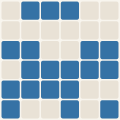
Mark
The project’s generated logo mark. The grid gets finer with the commit count, and the cells show the split between languages. It’s redrawn as the project grows.
Palette
The colors Stamp uses across this site: one hue from its discipline’s band, plus the shades that make it work on both dark and light backgrounds.
Type
The two typefaces on the site: a sans-serif for the interface and a serif for headlines.
Next
Download Stamp
Installers for Windows and macOS are on GitHub. Version 1.6.5 is the latest build with installers attached.
Stamp-1.6.5-Setup.exe
Stamp-1.6.5-macos-arm64.dmg
Stamp-1.6.5-macos-x86_64.dmg
The Windows installer doesn’t need admin rights. The builds aren’t code-signed yet: on Windows click through SmartScreen, and on macOS Control-click the app and choose Open the first time.
Questions, or something it doesn’t do yet? Email dmoore@