$ dide gallery
See it work
The interactive piece from the front page, with room to try it, followed by DIDE’s logo, colors and type.
The code IDE is done. The game editor is half built.
DIDE is built in phases from a written specification, each one closed before the next begins.
-
Phase 1a
The code editor
Done
Monaco, files and search, a terminal, language servers for C, Slang, TOML and CMake, themes, and git with blame, merges and worktrees. Its exit test was a day of DEngine work without VS Code.
-
Phase 1b
Build, debug and AI
Done
CMake presets, tasks, a test explorer and lldb debugging. AI with your own providers: inline completion, chat, and an agent whose edits you review. Plugins, and the Andare, Disegno and Trama suite inside the IDE.
-
Phase 1c
Windows and release
Done
A DbgEng debugger with visualizers and crash dumps, GPU capture, a Tracy profiler view, installers and an updater.
-
Phase 2
Editing a running game
Done, on a mock engine
An editor protocol with generated code, the viewport and camera, picking, gizmos, the hierarchy and inspector with undo, play-in-editor, multiplayer play-in-editor and input replay. Tested against a stand-in engine until DEngine serves the protocol itself.
-
Phase 3a
Assets
In progress
An asset browser, importers and their settings, references, bundles, viewers and a node-graph framework, then materials, prefabs and packaging.
-
Phase 3b–3d
World, animation, audio and more
Planned
Terrain, foliage, lighting and navigation; animation clips, IK and state machines; sound, input maps and a UI editor; a material graph, sequencer and Steam tools.
Assets
Logo, colors, and type.
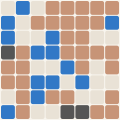
Mark
The project’s generated logo mark. The grid gets finer with the commit count, and the cells show the split between languages. It’s redrawn as the project grows.
Palette
The colors DIDE uses across this site: one hue from its discipline’s band, plus the shades that make it work on both dark and light backgrounds.
Type
The two typefaces on the site: a sans-serif for the interface and a serif for headlines.
Next
Put DIDE in your pipeline
Ask about hooking it up to the repositories and agents you already run.